Race Monitor
- 3.5
- Rating
- 500.00K
- Installs
- Free
- Price
 Analysis by App-foxy
I installed Race Monitor expecting a simple way to glance at motorsport timing, and that is still the clearest way to understand it. This free sports app, developed by Race Monitor, is aimed at people who want live race information on a phone rather than a full broadcast, a browser tab, or a timing screen beside the track. Its strength is focus: when a supported event is running, the app can turn a small screen into a useful companion for following the order of a race.
My experience is best summed up this way: Race Monitor is most valuable when timing information matters more than video. It is not trying to replace television coverage or a detailed racing simulator. Instead, it suits the moments when I want to know who is leading, how a session is progressing, or whether a driver I care about has moved through the field. That makes it particularly interesting for spectators, club-racing followers, family members waiting for results, and anyone who enjoys keeping an eye on several events around the world.
It has been available since late 2010, which gives the app a long-running identity in a category that depends on reliable event coverage. The current store profile shows a 3.5 average from around 1.7 thousand ratings, with more than 500 thousand installs. Those figures suggest a well-established niche audience rather than a universal sports app. The Everyone age rating also makes it approachable for households where several people may want to follow the same event.
You May Also Like

 Blood Strike: 2.5 Anniversary
Blood Strike’s Loadouts Turn Every Drop Into a Tactical Gamble
A close look at Blood Strike’s custom loadouts: how fast access to signature weapons reshapes its battle royale rhythm, rewards preparation, and narrows the gap between fights.

 Pandora - Music & Podcasts
Pandora’s Music Is Easy to Start, but Harder to Recover
Pandora’s strength is its low-effort path from a seed to a station. Its weak spot is how much confidence it asks you to place in connection, setup, and quiet recovery.

 8 Ball Pool
8 Ball Pool Is Built on Rivalries, Rematches, and Routine
A close look at the rivalries, rematches, shared routines, and unanswered safety questions that turn a quick pool match into a persistent mobile community.

 Samsung Music
Samsung Music’s Quiet Strength Is Playing What You Already Own
Its reach comes less from spectacle than from dependable access to a personal library. That simplicity is both the app’s strongest retention engine and its ceiling.

 AccuWeather: Weather Radar
AccuWeather Review: A Quick, Clear Forecast for Everyday Decisions
For everyday plans, the best forecast is the one you can understand quickly. AccuWeather makes rain timing, radar, and local conditions easy to act on, with a few trade-offs.

 Hill Climb Racing
Why Hill Climb Racing Still Turns Crashes Into One More Run
A tiny car, a bumpy hill and one more upgrade: Hill Climb Racing keeps resurfacing because its simple chaos makes every near-miss feel personal.
More From Our News Desk



What the app feels like during a live event
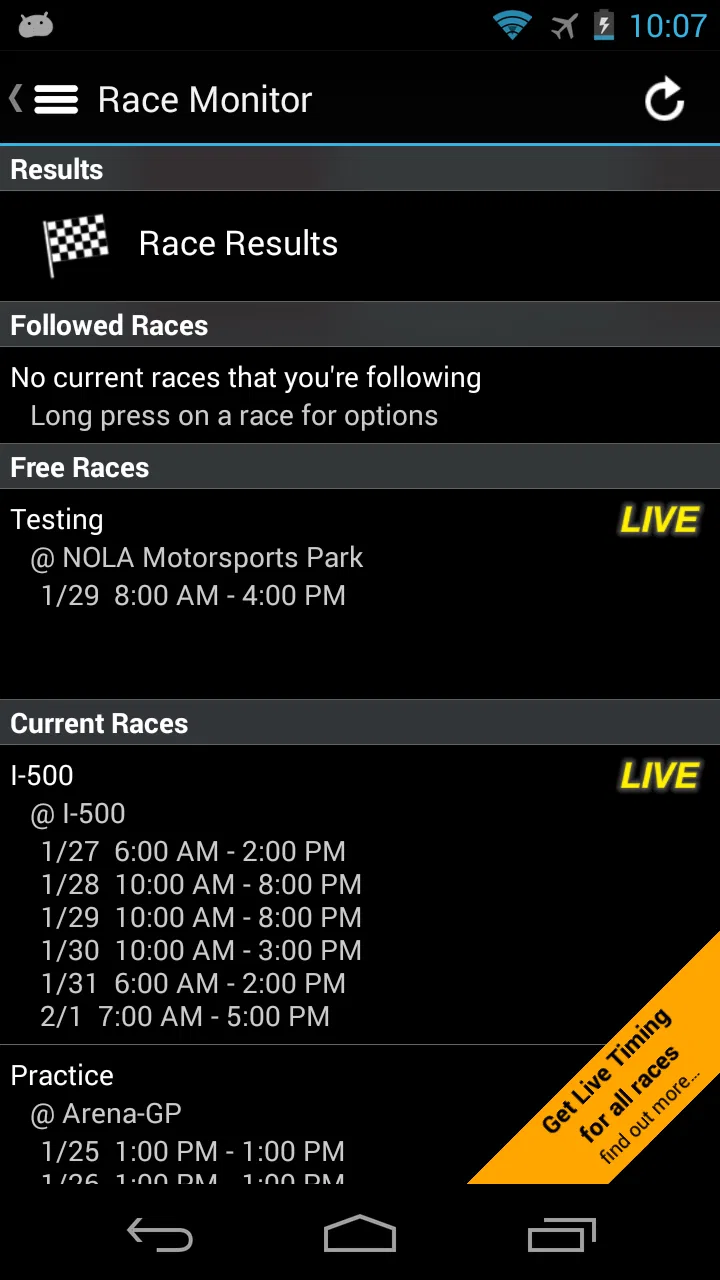
The central experience is built around choosing a race and watching its timing develop. That sounds straightforward, but the usefulness comes from how quickly live information can answer questions that a normal result page cannot. A finished result tells me where everyone ended up; a live timing view helps me understand what is happening right now.
When an event is available, I would use it as a companion rather than stare at it continuously. A quick check can tell me whether the leader has changed, whether a favorite is still circulating, or whether the race has reached a point where the final order is beginning to settle. This makes the app less demanding than a video stream, especially when I am doing something else at the same time.
The event-focused approach is also useful for smaller races that may not receive extensive television or social-media coverage. A major championship usually has several ways to follow it, including broadcast graphics and official channels. Local and club events often do not offer that same level of visibility. In those situations, a timing application can be the most practical window into the race, provided the event is included and the connection remains dependable.
I also like the distinction between watching a race and monitoring it. Video asks for attention and consumes more bandwidth. Timing lets me dip in and out. If I am at work, traveling, or waiting for someone, I can check the state of a session without committing to a stream. That is the app’s clearest everyday advantage over conventional sports video services.
Why the network matters more than it first appears
Live timing is inherently connected to an active source. Race Monitor’s value depends on receiving current event information, so the quality of my experience is shaped by the network at the exact moment I need an update. A strong connection makes the app feel immediate. A weak or changing connection turns the same screen into something I have to interpret cautiously.
This matters at race tracks, where mobile coverage can vary with location and crowd density. It also matters in places such as underground stations, large buildings, rural roads, and busy public venues. A timing app may be lighter than video, but “lighter” does not mean independent of connectivity. I would open the event before the most important part of a race, confirm that the information is updating, and avoid assuming that a frozen display represents the current order.
That simple habit is one of my most useful tips: check the freshness of the screen before reacting to it. If I am following a close finish, an old position can be more misleading than no position at all. The app is designed for live race information, but the phone still needs a working path to receive that information.
There is another subtle network trade-off. A timing screen can be a sensible alternative to video when I am trying to reduce data use, but repeated refreshes and long sessions still involve ongoing communication. I would not treat it as a completely data-free way to follow racing. On a limited mobile plan, I would use it selectively, especially during long events or when moving between networks.
Using it at the track, at home, and on the move
At home, I would place Race Monitor alongside a television broadcast or a race stream. The screen can answer questions that the broadcast may not show clearly, such as the wider order outside the camera shot. It can also be useful during advertisements or when the broadcast focuses on one part of the circuit. In this setup, the app is not the main attraction; it is a second source of context.
At a circuit, the role changes. The atmosphere is much better in person, but it is not always easy to know what is happening across the entire field. Noise, distance, limited sightlines, and a constantly changing race order can make a timing view genuinely helpful. I would use it with the phone brightness kept sensible and the device secured, because repeatedly holding a phone up in a crowded spectator area is inconvenient and distracting.
For a family member following a driver, the app can reduce the need for constant messages. Instead of asking someone at the event for every update, I can check the race myself when the connection allows it. That is a realistic use case for parents, partners, and friends who want to follow a participant without being immersed in every lap.
On public transport or during a short break, the app works best as a quick-check tool. I would select the event, read the current picture, and close it rather than leave it open all day. This approach keeps the experience purposeful and helps avoid the frustration of watching a screen that may stop updating while the phone changes networks.
Finding the right event and avoiding false expectations
The app’s broad appeal comes from coverage of hundreds of races around the world, but that should not be confused with a guarantee that every event is available at every moment. My first task would always be to search or browse for the specific race I care about before relying on it. A general promise of wide coverage is useful, but racing calendars are fragmented, and the event itself remains the deciding factor.
This is especially important for people following a small local meeting. I would test the app ahead of time, not when the lights are about to go out. If the event appears and its timing is active, I can plan around it. If it does not, I would switch early to the organizer’s own updates, a broadcaster, or another established timing source rather than spend the opening laps troubleshooting.
That workflow is more reliable than installing the app and assuming its name alone guarantees coverage. It also helps distinguish two separate problems: an event may not be represented, or the network may be preventing current information from arriving. Checking the event list before race day makes the difference easier to understand.
Practical limits, recovery, and the value of a focused tool
Every live information app has moments when the experience becomes uncertain, and Race Monitor is no exception. A connection can drop, a phone can move between Wi-Fi and mobile data, or the event screen can appear slower than expected. My response would be methodical: first check whether the phone itself still has connectivity, then return to the event view, and finally reopen the app if the display remains unchanged.
I would not immediately interpret a delayed screen as a change in the race. Live timing is only useful when I know whether it is current. Closing and reopening the event can help me re-establish a clean view, but I would still compare the timing with another available source during a decisive moment. That is not a criticism unique to this app; it is a sensible precaution whenever a live feed becomes questionable.
The app is also not the right choice for someone who wants rich visual storytelling. If I want onboard footage, commentary, interviews, technical analysis, or a polished replay, a broadcaster or video service is better. Race Monitor’s compact timing focus is an advantage for quick information, but it leaves out the atmosphere and explanation that make a full race presentation enjoyable.
Likewise, people who need a permanent, detailed record of every session may prefer a specialist results database or the official series platform. A live monitor answers “what is happening now?” more naturally than it answers every historical question. I would choose it for immediacy and choose another tool when deep archives, official documents, or extensive analysis are the priority.
Its free entry point makes trying it easy, while optional in-app purchases range from under a dollar to several dollars per item. I would begin with the free experience and only consider spending if the app fits my regular routine. The important question is not whether a paid option exists, but whether the events and live checks I personally need justify it. Someone who follows racing only occasionally may never need to pay; a dedicated follower may find additional access worthwhile.
Because the app is categorized as a sports app rather than a social network or a video platform, I would approach it with the right expectations. It is a utility for race awareness. That narrow purpose is why it can be convenient, but it is also why it may feel bare to users expecting a large media package. The best experience comes from treating it as one precise instrument in a broader race-following setup.
Small habits that make live monitoring easier
I found three habits particularly useful. First, I would open the event before the session becomes important and make sure the selected race is actually updating. This prevents a last-minute search from becoming part of the race itself.
Second, I would use timing to create a viewing rhythm instead of leaving the screen running constantly. A check before the start, another after a major phase, and a final look near the finish can provide plenty of context without turning the phone into a permanent distraction. This is especially practical when battery life, attention, or mobile data matters.
Third, I would keep a second source in mind for confirmation during a close finish. A television graphic, official announcement, or trusted event channel can help when the app appears delayed. The insight here is that Race Monitor works best as a fast reference, not as a reason to ignore every other signal around a live event.
There is also a useful distinction between being a spectator and being responsible for a team. A casual viewer can tolerate an occasional delay and simply return later. A team member, marshal, or organizer may need a more dependable operational system with clearly defined responsibilities. I would not make this app the sole basis for a safety-critical decision or an official race-control task. Its role is following information, not replacing professional event procedures.
Who should install it?
I would recommend Race Monitor to anyone who follows multiple races, attends events in person, or wants live order information without watching a video. It is a good fit for a fan who checks results during a commute, a parent tracking a child’s event, or a spectator who cannot see the whole circuit from the grandstand. It also makes sense for people who prefer concise information over commentary and camera cuts.
I would be more hesitant to recommend it to someone who only watches major televised races and wants a complete entertainment package. That person may get more value from the broadcaster’s app or the official series service. I would also suggest skipping it if the main need is offline reference material, deep historical research, or guaranteed coverage of one specific local event. Those needs call for a different kind of product or a direct source from the organizer.
For users concerned about mobile data, the sensible approach is selective use. Timing is generally a more restrained companion than video, but I would still monitor the phone’s data settings and avoid leaving live sessions open unnecessarily. On an unstable connection, I would treat the display as a helpful indication rather than unquestionable proof until it refreshes normally.
The age rating of Everyone is consistent with the app’s practical purpose. There is no need for it to be aimed at a specialist adult audience; a young racing fan can understand a live order with guidance. Still, younger users may need help interpreting gaps, laps, and changing positions, because a live timing screen can look simple while requiring some knowledge of the event.
My final view on Race Monitor
After using it as a live companion, I see Race Monitor as a focused tool with a clear place in a racing fan’s phone. It does not try to be a streaming service, a social community, or a complete archive. Instead, it concentrates on the practical question of where a race stands while the event is happening. That focus is its strongest quality.
The connection-dependent nature of live timing is also its main condition. When the network is stable and the event is available, the app can be a remarkably convenient way to stay informed without spending an entire session watching video. When coverage or connectivity becomes uncertain, I need a backup source and a little patience. Knowing that trade-off makes the experience much less frustrating.
Race Monitor is free to start, carries an Everyone rating, and comes from a developer that has kept the product present in the sports-app space since 2010. Its 3.5 average indicates a useful but not universally perfect experience, which matches my judgement: the app is genuinely handy for the right task, yet too specialized for people seeking a full race presentation.
I would recommend it as a practical second screen for live racing, especially when quick timing matters more than video. Just verify the event before relying on it, check that updates are current, use mobile data thoughtfully, and keep another source available for critical moments. Used with those expectations, it earns a place among the simplest ways to keep track of a race while life continues around it.
In short, Race Monitor is worth trying if your ideal sports app lets you glance, understand, and get back to what you were doing. It is less suitable if you want a cinematic broadcast or a complete racing encyclopedia. For spectators and followers who value live awareness above spectacle, that narrow purpose is not a weakness; it is exactly why the app can be useful.
FAQs for Race Monitor
01What is Race Monitor and what can I use it for?
Race Monitor is a motorsport companion app that lets fans follow live race information from supported events and tracks. Depending on the event, you may be able to view driver positions, lap times, lap counts, timing data, class standings, and other race details. It is especially useful when you are at a circuit and want quick access to timing information without relying only on the public-address system or track screens.
02Does Race Monitor provide live timing for every race and racing series?
No. Race Monitor depends on timing data being supplied by participating tracks, clubs, organizers, or racing series, so coverage can vary considerably. Before downloading it specifically for an event, check whether that race appears in the app’s available event list. Some events may offer complete live timing, while others may provide limited information, delayed updates, or no data if the organizer is not connected to the service.
03Does Race Monitor require an internet connection or mobile data?
An internet connection is generally required to download the event list and receive current timing updates. Mobile data may be used when Wi-Fi is unavailable, which is important to remember at crowded circuits where cellular networks can become slow or unreliable. The app may retain some previously loaded information, but you should not expect full live functionality offline. Checking the event before arriving can help avoid connection-related surprises.
04Is Race Monitor free to download, and are there any additional costs?
Race Monitor may be available to download without an upfront charge, but availability, advertising, premium features, or event-specific access can depend on the version and platform. The most reliable information is shown on its current Google Play or App Store listing. Review the store page before installing, particularly if you want to know whether the app includes in-app purchases, subscriptions, or charges connected with special timing content.
05Is Race Monitor suitable for professional teams, drivers, or only spectators?
Race Monitor is primarily designed for spectators, families, and racing enthusiasts who want convenient access to event timing. It can also be useful as a quick reference for drivers or teams, but it should not automatically be treated as an official substitute for race control, timing-loop equipment, team radio, or organizer-issued results. For important sporting or technical decisions, always confirm information through the event’s official timing and communication channels.
Pros
- Live timing updates for many racing events worldwide.
- Useful driver
- class
- and session information in one place.
- Simple interface makes results quick to find at the track.
- Helps fans follow races even when they cannot attend.
- Supports multiple event types and racing series.
Cons
- Coverage depends heavily on organizers using the Race Monitor system.
- Some events may show limited data or delayed timing updates.
- The interface feels dated compared with newer racing apps.
- Frequent notifications can become distracting during busy race days.
- Results and event details may vary in accuracy between organizers.

Race Monitor
Gallery